Connect iPod to your TV: Watch Videos, Pictures on the large screen
 Music Videos, Movies, TV shows, Slideshows of Family Photographs are more fun to watch on a large TV set than on the tiny iPod Video Screen. Another drawback is that only one person with iPod earphones can listen to the background music - others will only see moving picture and are likely to loose interest very soon.
Fortunately, connecting iPods to the television using standard ports is very much possible. Here we discuss different options to connect the video ipod to your Television set so that you can enjoy the iPod content in the living room with your entire family.
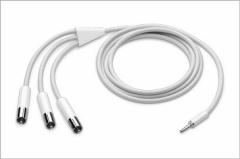
Apple iPod AV Cable - The iPod AV Cable provides composite video and audio output for viewing photo slideshows with music on a TV. You can also hook the AV Cable to your stereo or powered speakers.
iPod AV Connection Kit - It comes with a Universal Dock and an iPod AV Cable that connects the iPod to the Audio In ports of the home audio system or the composite video input on a TV or computer monitor.
Apple iPod Universal Dock - This lets you display photos or videos on a TV or Monitor using an iPod AV Cable or a standard S-video cable.
Monster iTV Link for iPod photo - Use the Monster iTV Link to connect the S-Video and 3.5mm Audio jacks on the back on the iPod photo Dock to give you the highest quality images possible on your S-Video equipped TV.
DLO HomeDock Deluxe - This non-Apple device lets you play iPod videos on large screen TV via AV connection or S-Video. It turns you TV into a Media Center like as even the iPod navigation is controlled by the supplied remote control. Works with dockable, click wheel iPods - including iPod nano, Video iPod, 4G iPod and iPod mini [not iPod Shuffle] - Website
Griffin TuneCenter - Like the DLO device, TuneCenter (from the makers of iTrip) displays the iPod playlists and song information on your TV screen. TuneCenter also plays internet radio stations. Website
A few things to remember: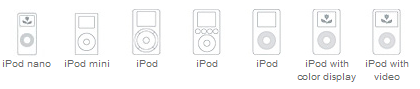
Although iPod nano has a color display, it won't output a slideshow to a TV. Some televisions may need to be set to channel 3 or 4 or "video" to receive input. The correct TV format (NTSC or PAL) can be choosen using the Photos > Slideshow Settings > TV Signal settings in your iPod. Only the Apple iPod AV Cable works with the iPod Headphones and AV port.
More information: iPod: Viewing a slideshow | iPod TV Out
All the above iPod TV accessories are available from the local Apple Store.
Connect iPod to your TV - Illustrated Tutorial with pictures. Similar methods can be applied to connect an iPod to a projector.

0 comments:
Post a Comment